How AI Agents Are Changing DevOps: From Runbooks to Autonomous Workflows
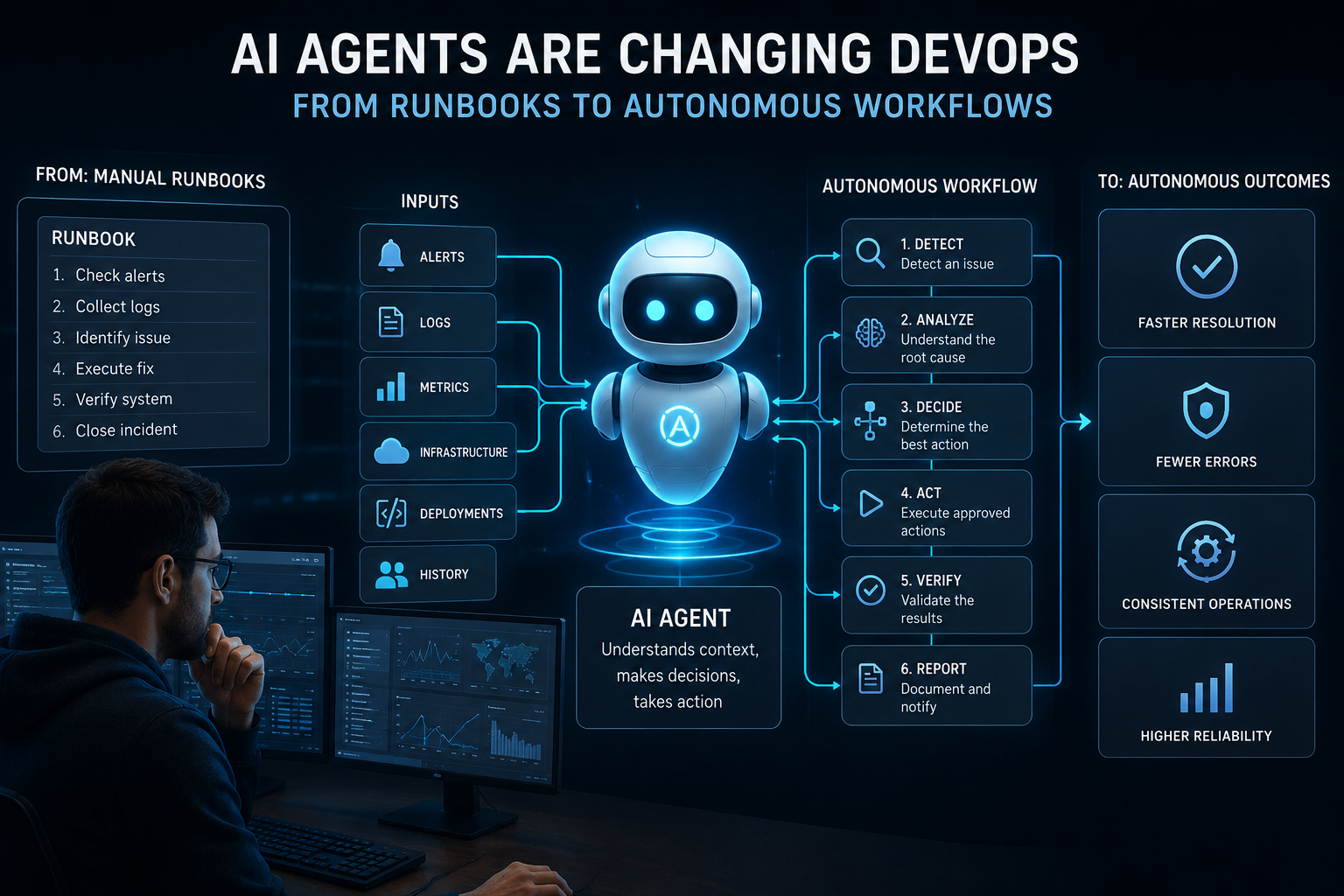
Introduction DevOps teams have relied on runbooks for years to document how common operational problems should be handled. A runbook may explain how to restart a service, investigate a failed deployment, scale a workload, or recover from a known incident. The limitation is that a runbook is usually a document or predefined procedure. A person still needs to identify the relevant procedure, collect the right information, interpret the situation, execute the required commands, and confirm that the system recovered. AI agents change this model by connecting operational knowledge with tools and actions. Instead of only explaining what an engineer should do, an agent can gather context, work through multiple steps, use approved tools, and verify the result. The important change is not simply adding AI to DevOps. It is connecting reasoning, operational data, tools, and controlled execution inside the same workflow. Quick summary AI agents can extend traditional DevOps runbooks into context-aware workflows. They can investigate alerts, gather information from logs and infrastructure, select appropriate actions, execute approved operations, and check whether those actions worked. This does not mean every DevOps task should become fully autonomous. High-impact operations still require permissions, isolation, approval controls, and audit records.
From Manual Runbooks to AI-Powered DevOps
A traditional runbook describes a known operational procedure. It may contain commands, diagnostic checks, escalation instructions, and recovery steps. For predictable incidents, this approach works well. The problem appears when the current situation does not exactly match the documented example. An engineer may need to check recent deployments, compare logs, inspect service health, review infrastructure state, and decide which branch of the procedure applies. The runbook provides knowledge, but the engineer supplies the context and judgment. AI agents can connect these pieces. An agent can retrieve relevant operational documentation, inspect available system information, and use defined tools to investigate the current state. This makes the runbook more than static documentation. It can become operational knowledge that an agent uses while working through a task. AI Agents vs. Traditional DevOps Automation Traditional automation normally follows predefined logic. If a condition is true, a script or workflow performs a specified action. AI agents can work differently. They can interpret information, select among available tools, and work through multi-step tasks where the exact path depends on what they discover. An AI assistant may tell an engineer which command to run. An AI agent can potentially run that command when it has the required permissions and the workflow allows execution. This distinction does not make deterministic automation obsolete. In production environments, predictable operations are often easier to test and control with conventional automation. A practical architecture can therefore combine both approaches. Deterministic workflows can handle fixed operations, while an AI agent can interpret context, select an appropriate procedure, and pass structured results between workflow steps. How AI Agents Execute a DevOps Workflow A useful AI-powered DevOps workflow can be divided into several stages. Detecting an incident The workflow begins with an event such as an alert, failed deployment, unhealthy Kubernetes workload, infrastructure change, or unusual system behavior. Understanding the operational context The agent needs more than the alert itself. It may need service information, recent changes, dependencies, historical incidents, runbooks, and current system state. Checking logs, APIs, and infrastructure The agent can use approved tools to retrieve logs, metrics, traces, API responses, deployment information, or infrastructure state. This step is important because an agent should base its next action on available evidence rather than on the alert message alone. Executing approved actions If remediation is permitted, the workflow can allow the agent to perform specific actions. These might include restarting a workload, changing a configuration, rolling back a deployment, or opening a change request. Permissions should limit what the agent can do. Verifying the outcome Execution is not the end of the workflow. The system should check whether the intended result actually occurred. For example, restarting a service is not sufficient if the service remains unhealthy. Verification can include health checks, metrics, logs, or application-level tests. Reporting the result The workflow should record what happened, which tools were used, what actions were taken, and whether the expected result was achieved. This creates an operational record that engineers can review. Key DevOps Use Cases for AI Agents Automated Incident Response Incident response is one of the clearest use cases. An agent can gather information from multiple systems, investigate possible causes, follow an appropriate runbook, and perform bounded remediation when authorized. Google Cloud describes agentic SRE patterns that combine observability data, system context, playbooks, and controlled mitigation. Kubernetes Operations Kubernetes environments generate large amounts of operational state. AI agents can help inspect workloads, events, configurations, and cluster information. The Kubernetes community is also exploring infrastructure specifically suited to long-running AI agents, including isolated execution environments for agents that need to use tools and execute code. Cloud Infrastructure Automation Cloud operations often involve checking resource state, identifying configuration problems, and applying changes through APIs or infrastructure tools. An agent can help coordinate these steps, provided its permissions are narrowly defined. Runbook Automation Runbooks can provide the operational knowledge an agent needs. Instead of asking an engineer to manually interpret every instruction, an agent can retrieve the relevant procedure and use it as part of a controlled workflow. This does not remove the need to maintain runbooks. Poor documentation gives an agent poor operational context. Cloud Cost Optimization Agents can inspect resource usage, identify unusual consumption, and investigate possible optimization opportunities. Actions that change production resources should remain subject to defined limits and approval policies. CI/CD Workflow Automation AI agents can also operate around software delivery workflows. They can investigate failed builds, inspect deployment changes, collect test results, and help determine the next permitted step. The agent should not automatically bypass deployment controls simply because it identifies a possible solution. Why Autonomous DevOps Needs Security Guardrails Giving an AI agent access to production systems creates a different security problem from using an AI assistant for information. The agent may be able to read sensitive information, call APIs, execute commands, or modify infrastructure. A mistake can therefore have operational consequences. Security controls should include least-privilege permissions, protected credentials, isolated execution environments, approval requirements for high-risk operations, and detailed audit logging. Microsoft recommends controls around agent permissions, runtime safeguards, logging, and monitoring. AWS guidance also emphasizes trust boundaries and workflow-level security controls for agentic systems. Human approval remains useful for actions that are irreversible, financially significant, security-sensitive, or capable of affecting large parts of a production environment. From Individual Agents to Autonomous DevOps Workflows An individual agent becomes more useful when it is connected to a broader workflow. The workflow can receive an alert, gather context, invoke an agent, provide access to approved tools, execute deterministic steps, request human approval when necessary, and verify the final state. This creates a system in which the agent is one component rather than the entire automation layer. The same pattern can support multiple operational systems. An agent may work with monitoring platforms, Kubernetes, cloud APIs, ticketing systems, source control, and CI/CD tools while the surrounding workflow controls when and how those tools can be used. This is closer to autonomous DevOps than simply placing a chatbot beside a dashboard. What Autonomous DevOps Actually Means Autonomous DevOps should not mean unrestricted access or unsupervised control over production. In practical terms, autonomy means that a system can interpret an operational situation, select from permitted actions, execute multiple steps, and verify the outcome without requiring a person to manually perform every intermediate task. The boundaries still matter. Google Cloud notes that agentic operations can reduce manual effort while retaining human involvement for higher-risk services and actions. A well-designed autonomous workflow therefore combines AI reasoning with deterministic controls, restricted permissions, verification, and human escalation. Conclusion AI agents are changing DevOps by connecting operational knowledge with context, tools, execution, and verification. Traditional runbooks remain useful, but they do not have to remain static documents. They can become part of workflows in which agents investigate incidents, work with infrastructure, execute approved actions, and verify results. The practical path toward autonomous DevOps is controlled rather than unrestricted. AI agents can handle more operational steps, while security boundaries and human oversight remain important for high-impact decisions. For teams exploring this model, the key question is not whether an AI agent can perform an action. The better question is whether that action can be performed safely, with the right context, permissions, verification, and audit trail. For further information about AI-powered DevOps workflow automation, see Gripo.io. FAQs What are AI agents in DevOps? AI agents in DevOps are software systems that can interpret operational information, use defined tools, perform multi-step tasks, and respond to changing conditions within controlled boundaries. How can AI agents automate DevOps workflows? They can gather information from monitoring systems, logs, APIs, infrastructure, and documentation, then use approved tools to investigate problems, execute actions, verify results, and report outcomes. Can AI agents automate DevOps runbooks? Yes. A runbook can provide the procedures and operational knowledge an agent uses during a workflow. The agent can select relevant steps based on the current context rather than requiring an engineer to execute every step manually. How do AI agents improve incident response? They can reduce the manual work involved in gathering context and coordinating investigation steps. They can also correlate information from different operational systems before proposing or performing an approved remediation. Can AI agents manage Kubernetes operations? They can assist with Kubernetes investigation and operations when connected to appropriate Kubernetes tools and permissions. Kubernetes is also being developed as infrastructure for running long-lived, isolated AI agent workloads. Are autonomous DevOps workflows secure? They can be designed with security controls, but autonomy does not make a workflow secure by itself. Least-privilege access, credential protection, isolation, approval controls, monitoring, and audit logs are important safeguards. What is the difference between AI-assisted and autonomous DevOps? AI-assisted DevOps usually keeps a person responsible for executing important actions. Autonomous DevOps allows the system to execute defined actions itself, while operating within technical and organizational boundaries.